

ClickUp Review (2026): The “Everything App” That Finally Makes Sense
Let’s be honest.
Most teams don’t fail because they lack tools.They fail because they have too many tools that don’t talk to each other.
Tasks in one app.Docs in another.Goals in a spreadsheet.Automations half-working somewhere else.
ClickUp’s promise has always been bold:
One app to replace them all.
But for years, the question lingered- Was ClickUp powerful… or just overwhelming?
In 2026, the answer is clearer than ever.
👉 In this review, I’ll break down what ClickUp actually does well today, where it still struggles, and who will get real value from it.
🧠 What Is ClickUp (Beyond the Hype)?
ClickUp is a work management platform designed to centralize:
- Tasks
- Docs
- Goals
- Dashboards
- Automations
- Team collaboration
But its real strength isn’t “features.”
It’s structure.
ClickUp lets teams model how work actually flows- from idea → execution → review → delivery- inside one system.
Think of it as:
A configurable operating system for teams.
👉 Want to explore ClickUp yourself? Try it here.
⚡ ClickUp’s Standout Features (2026 Edition)
1️⃣ Tasks That Adapt to How Your Team Works
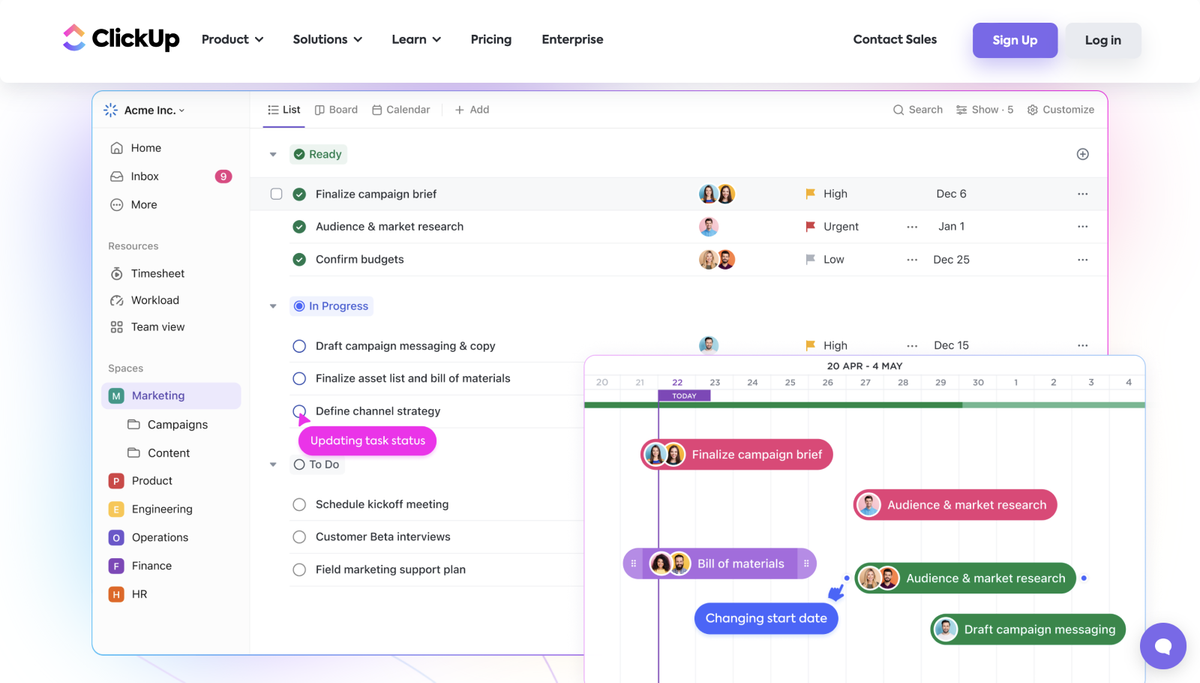
ClickUp’s task system is deeply customizable:
- Statuses that match your workflow
- Custom fields for context (priority, client, effort, cost)
- Dependencies and subtasks
- Multiple views (List, Board, Timeline, Gantt)
📌 Who benefits: Project managers, ops leaders, delivery teams💡 2026 edge: Faster performance and cleaner task navigation than earlier versions.
2️⃣ Docs That Actually Connect to Work
ClickUp Docs aren’t just notes.
You can:
- Embed tasks directly into docs
- Turn text into action items
- Collaborate in real time
- Store SOPs, playbooks, and specs next to execution
📌 Who benefits: Teams tired of Notion + PM tool juggling💡 2026 edge: Better linking between docs, tasks, and goals.
3️⃣ Dashboards That Tell You the Truth
Dashboards are where ClickUp shines for leadership.
You can track:
- Workload by team or individual
- Delivery progress
- OKRs and goals
- Bottlenecks and risks
📌 Who benefits: Founders, heads of delivery, PMO leaders💡 2026 edge: Improved widgets and real-time data refresh.
4️⃣ Automations Without Leaving the Platform
ClickUp includes native automations for:
- Status changes
- Task assignments
- Notifications
- Recurring workflows
While not as powerful as n8n, they’re perfect for day-to-day ops.
📌 Who benefits: Teams reducing manual admin💡 2026 edge: Expanded automation templates and reliability.
5️⃣ AI That Supports Work (Not Replaces Thinking)
ClickUp AI has matured.
It now helps with:
- Writing task descriptions
- Summarizing updates
- Drafting docs
- Breaking goals into tasks
📌 Who benefits: Knowledge workers, managers💡 2026 edge: AI feels assistive- not intrusive or gimmicky.
✅ Pros and Cons of ClickUp
✅ Pros
- Extremely flexible and customizable
- Replaces multiple tools if set up well
- Strong dashboards and reporting
- Competitive pricing for feature depth
- Active product development
⚠️ Cons
- Can feel overwhelming without a clear setup
- Learning curve for non-technical users
- Too many features for small, simple teams
- Requires governance to avoid chaos
💡 Who Should Use ClickUp?
👉 Great for:
- Startups scaling their operations
- Project and program management teams
- Agencies managing multiple clients
- Leaders who want visibility without micromanaging
👉 Maybe not ideal if:
- You just need a simple to-do list
- Your team resists process and structure
- You want zero setup or configuration
💵 ClickUp Pricing (2026 Overview)
👉 The value-per-dollar is hard to beat if you actually use the features. Explore ClickUp here.
🔄 ClickUp vs Alternatives
🌟 Quick Summary
Why it’s hot in 2026:ClickUp has matured from “too much” into a serious execution platform- if you use it intentionally.
❓ FAQs
Is ClickUp too complex?⚠️ It can be- without a clear structure.
Can ClickUp replace Notion + Asana?✅ Yes, for many teams.
Is ClickUp good for solo users?⚠️ Often overkill.
Does ClickUp scale?✅ Very well, especially for ops-heavy teams.
🏁 Final Verdict: Is ClickUp Worth It in 2026?
ClickUp isn’t magic.
But for teams willing to define how they work, it becomes a single source of truth- not just another app.
👉 Want one place where work actually gets done? Try ClickUp here.