

Best AI graphic Design tools in 2026
Compare top AI graphic design tools in 2026 — features, pricing, and best use cases for designers, marketers, and teams.
AI graphic design tools in 2026 have transformed workflows for professionals and beginners alike. These tools now handle everything from creating brand assets to generating editable vector files, making them indispensable for designers. Here’s a quick rundown of the top options:
- Figma: Streamlines UI/UX workflows with AI-generated layouts, real-time suggestions, and collaboration features. Pricing starts at $15/month per editor.
- Canva Magic Studio: A favorite for social media and marketing with tools like Magic Layers and Magic Design. Plans range from free to $15/month.
- Adobe Firefly: Offers legally safe, AI-powered editing tools integrated with Photoshop and Illustrator. Pricing starts at $9.99/month.
- Midjourney: Excels at generating visually stunning concept art, available via subscription starting at $10/month.
- Stable Diffusion/DreamStudio: Highly customizable, open-source tool for advanced users. Free for local deployment or pay-as-you-go via DreamStudio.
- Recraft: Focused on vector graphics, delivering native SVG files for logos and icons. Pricing starts at $10/month.
- Upskillist: Education-focused platform teaching AI design tool mastery with subscription plans after a 7-day trial.
These tools cater to a variety of needs, from quick marketing designs to professional-grade outputs. Below is a quick comparison for clarity.
Quick Comparison
| Tool | Key Features | Best For | Pricing |
|---|---|---|---|
| Figma | AI-generated layouts, collaboration | UI/UX design | $15–$45/month |
| Canva Magic Studio | Magic Layers, Brand Kit integration | Social media, marketing | Free–$15/month |
| Adobe Firefly | Generative Fill, brand-safe outputs | Professional editing | $9.99–$19.99/month |
| Midjourney | High-quality concept art | Artists, mood boards | $10–$120/month |
| Stable Diffusion | Custom model training, open-source | Advanced users | Free/pay-as-you-go |
| Recraft | Native SVG, vector outputs | Logos, icons | $10–$48/month |
| Upskillist | AI tool education | Beginners, learners | Free trial, subscription |
Each tool offers unique advantages, so the right choice depends on your workflow, skill level, and project requirements.
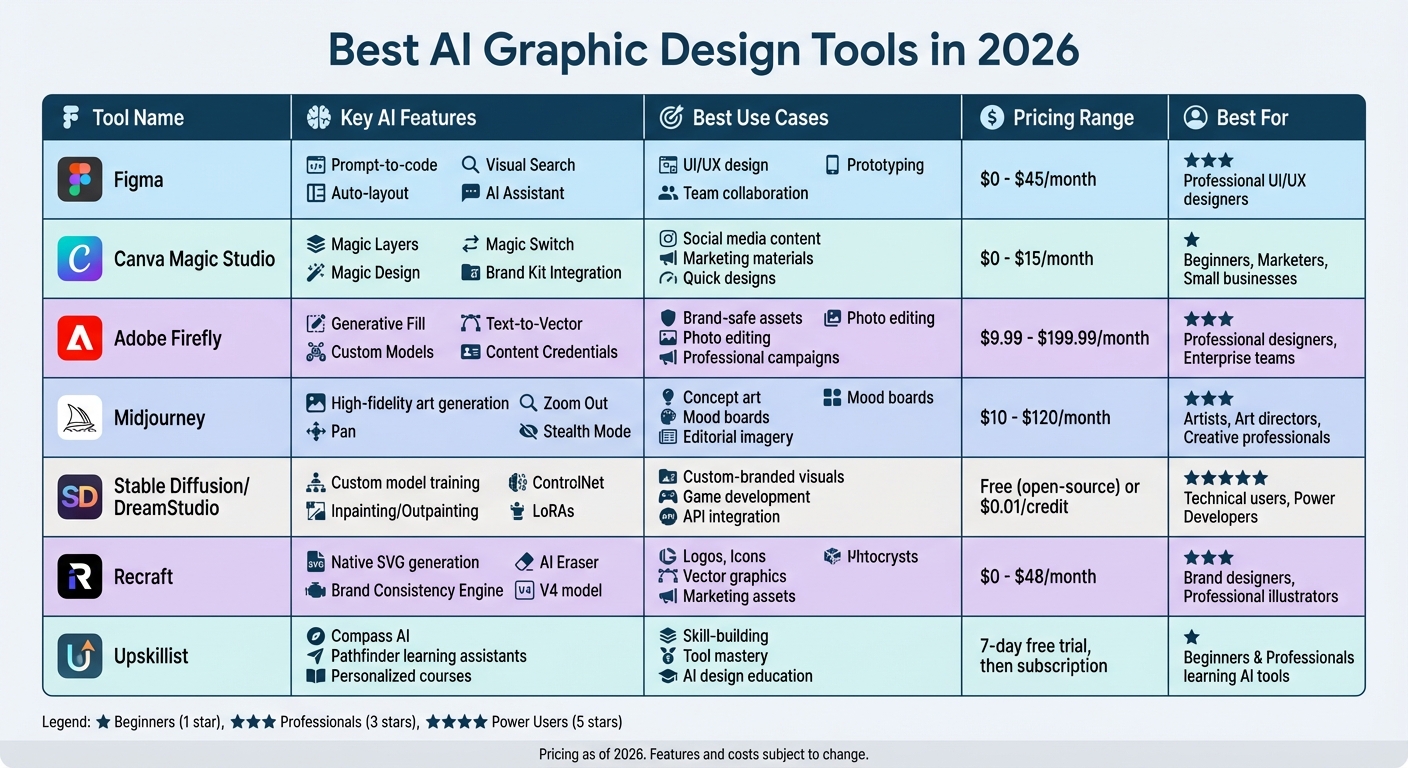
Best AI Graphic Design Tools 2026: Features, Pricing & Use Cases Comparison
5 Must-Have AI Design Tools in 2025 (Create Images Like A Professional Graphic Designer)
1. Figma
Figma has evolved from a collaborative design tool into a platform that integrates AI to streamline the entire UI/UX workflow. From initial concepts to developer handoff, Figma's AI features make it a go-to solution for teams creating digital products.
AI Features
Figma's Figma Make (previously known as First Draft) allows designers to turn natural language prompts into functional UI layouts, components, and even production-ready code. With just a few words, designers can generate multiple UI options that align with their design system. Marco Cornacchia, Product Designer at Figma, highlights how AI simplifies workflows:
"Search is the perfect example of how AI can pragmatically solve real pain points designers face every day. You spend all this time just looking for the right stuff... With Visual Search, you can instantly retrieve what you need".
The AI Assistant offers real-time layout suggestions, optimizes spacing and alignment, and even rewrites UX copy. It identifies patterns in your design system to suggest existing components, reducing redundancy. The Visual Search feature allows users to find similar components by uploading screenshots or selecting layers, even if those components are named differently across files.
Additional automation features include bulk renaming of layers, AI-generated filler copy, and one-click prototyping to transform static designs into interactive flows. Built-in image editing tools enable text-to-image generation, background removal, object erasure, and generative fills - all without leaving the design file.
These tools not only improve design accuracy but also streamline workflows, making them practical for real-world applications.
Use Cases
Figma is ideal for professional UI/UX design and rapid prototyping, addressing challenges like maintaining brand consistency and speeding up project timelines. Product teams can quickly generate drafts, explore various design directions, and ensure consistency across large projects. Lee Munroe, Head of Design at OneSignal, shares:
"Figma's AI features have helped us save time on some of the more tedious design tasks, like naming layers or coming up with dummy text, enabling our team to focus on more valuable impactful design".
The platform also excels in collaborative workflows. FigJam AI helps teams organize ideas into diagrams, synthesize feedback, and summarize meetings. AI-assisted tools for layer naming and design system consistency ensure files are well-structured and ready for developer handoff. Additionally, integration with Supabase allows designers to turn Figma Make concepts into functional web apps with user authentication and private APIs - no coding required.
Pricing
Figma's pricing is seat-based and includes access to all AI features:
- Starter plan: Free, includes 3 files and limited AI credits for individual use.
- Professional plan: $15 per editor/month, offers unlimited files and expanded AI features.
- Organization plan: $45 per editor/month, adds advanced design system tools and higher AI usage limits.
- Enterprise plan: Custom pricing, tailored for dedicated AI resources and the highest usage tiers.
Suitability for Beginners/Professionals
Figma's AI tools make it approachable for beginners while enhancing productivity for professionals. For those new to design, features like First Draft solve the "blank canvas problem" by turning text prompts into functional UI layouts. This enables users without extensive design skills to create prototypes and explore ideas quickly.
For experienced designers, Figma automates repetitive tasks while preserving creative control. Kat Temple, Senior Product Designer at ServiceNow, explains:
"The power to generate first drafts fast got my creativity going, sped up my workflow, and freed my mind to dream up unique ideas".
According to Figma's 2025 AI report, 33% of designers use AI to create design assets like images or copy, while 22% rely on it for generating first drafts of interfaces. Figma strikes a balance between automation and professional-grade output, making it a valuable tool for designers at all levels.
2. Canva Magic Studio
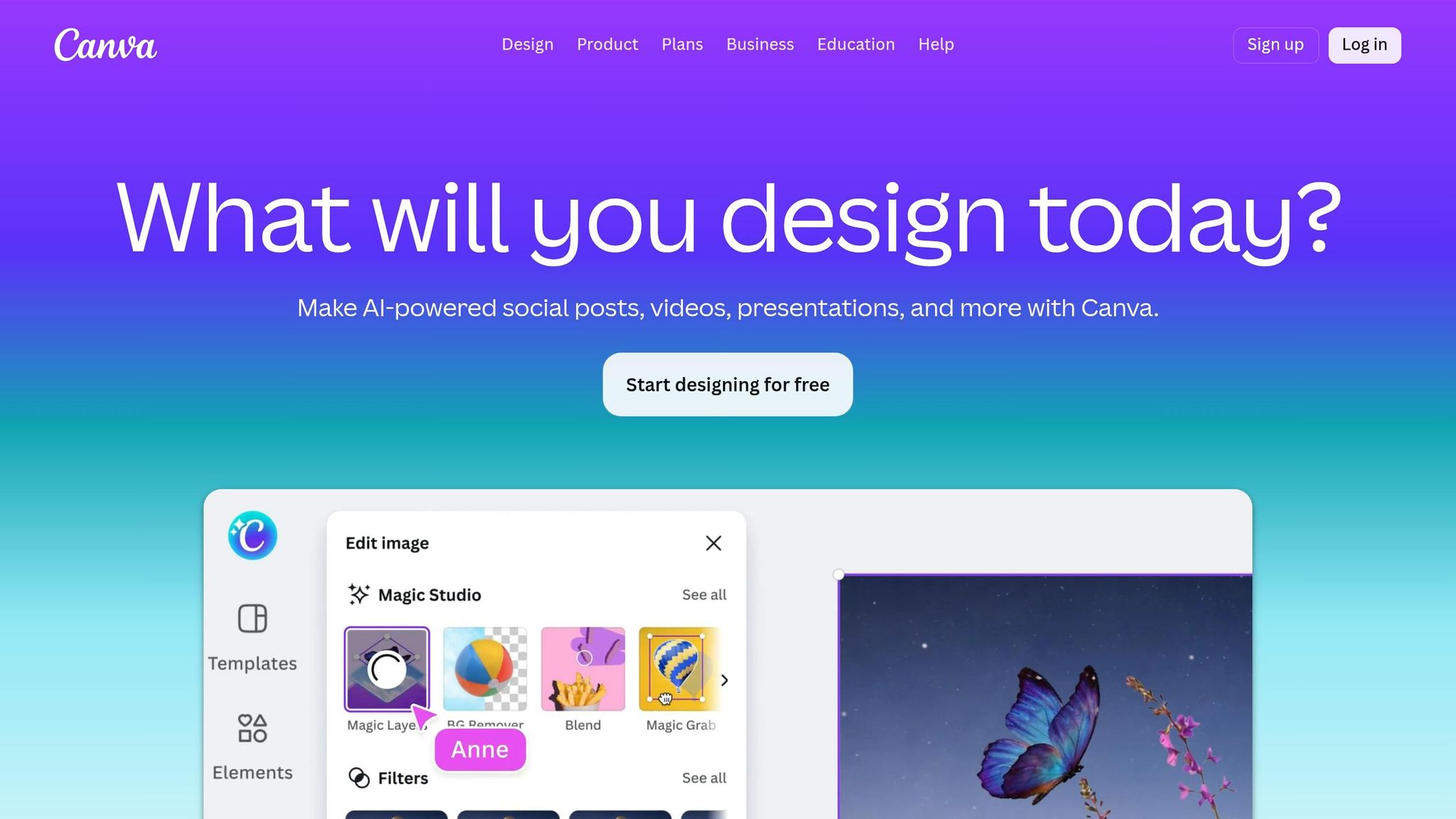
Canva Magic Studio combines over 20 AI tools into one platform, making it an appealing choice for marketers, small business owners, and anyone aiming to create polished content quickly. With 220 million users globally as of March 2026, Canva has become a popular solution for efficient design workflows. This comprehensive toolkit simplifies content creation and enables a wide range of design outputs in record time.
AI Features
Canva Magic Studio prioritizes workflow efficiency and maintaining brand consistency. Its standout feature, Magic Layers, introduced in March 2026, allows users to break down flat PNG or JPG images into editable layers in just 8–15 seconds. This means you can take a finalized image and separate its text, objects, and background into movable components. Cameron Adams, Canva's CPO, explains:
"AI should spark creation, not bring it to a halt".
Another key feature, Magic Design, generates 8–12 complete templates for presentations, social posts, or videos based on a single text prompt. What makes it even more useful is its Brand Kit Integration, which automatically applies your brand’s colors, fonts, and logos to the designs - eliminating the need for manual adjustments. Macedona, a SaaS reviewer, praised this functionality:
"Brand Kit adherence is genuinely impressive... Magic Design consistently applied our test brand palette intelligently".
Magic Switch transforms a single design into multiple formats - for example, converting a presentation into an Instagram carousel - or translates it into more than 100 languages while preserving its layout. Other tools include Magic Edit, which uses generative fill to alter specific parts of images, and Magic Grab, which isolates subjects for independent resizing or repositioning. The platform also features Canva Code and a 3D Generator for added versatility.
Use Cases
Canva Magic Studio is ideal for simplifying high-volume design tasks while ensuring brand alignment. It’s comparable to how Figma streamlines UI/UX design but tailored for content production. Marketing teams, for example, can reduce the time spent on creating social media calendars by up to 70%. Tech reviewer Sam Bytewise summed it up well:
"Magic Studio is best for 'good enough, fast enough' workflows where volume matters more than perfection".
The platform is particularly effective for rapid prototyping and creating brand-consistent marketing materials. Small businesses can use Magic Design to produce complete decks or social media assets, which can then be fine-tuned manually. Magic Layers is especially useful for editing static exports from other design tools by breaking them into editable components.
For teams, the Business and Enterprise plans include features like approval workflows and shared brand assets. Additionally, Canva Shield offers enterprise-grade protection, including indemnification for AI outputs and customizable AI usage controls for administrators.
Pricing
- Free plan: $0 – Limited Magic Write functionality and 10 AI image generations per month.
- Pro plan: $15/month or $120/year for one user – Includes 500 AI credits monthly and full Brand Kit access.
- Teams plan: Around $100/year per user for teams of 3+ – Adds collaboration tools and approval workflows.
- Enterprise plan: Custom pricing – Offers unlimited AI credits for accounts with 100+ seats and Canva Shield protection.
For users with heavy design needs, keeping track of credit usage is crucial, as the 500-credit monthly limit can run out quickly during intensive projects.
Suitability for Beginners/Professionals
Canva Magic Studio earns a 9/10 for ease of use, making it highly accessible for beginners. Its natural language prompts eliminate the need for technical expertise - just type something like "make this look professional", and you’ll get a polished result. By generating drafts that are about 80% complete, the platform helps non-designers overcome the "blank canvas problem".
For professionals, Canva is best suited for marketing teams and social media managers who prioritize speed and volume over pixel-perfect precision. It has an overall rating of 8.4/10, with the Magic Layers feature scoring 8.2/10. However, designers who require detailed control may find it less capable than tools like Photoshop.
Canva’s real strength lies in its all-in-one approach, eliminating the need for multiple subscriptions for AI writing, image generation, and background removal. Among its features, Magic Layers, currently in public beta for users in the US, UK, Canada, and Australia, has emerged as one of the most practical AI editing tools of 2026.
3. Adobe Firefly
Adobe Firefly is an AI-powered creative studio designed with commercial safety in mind. Unlike many other AI tools, it’s trained solely on Adobe Stock images, openly licensed content, and public domain materials. This ensures that the outputs are legally safe for commercial use. By early 2026, 86% of creators reported incorporating creative AI into their daily work, and Firefly's seamless integration with Photoshop, Illustrator, and InDesign makes it a natural choice for professionals. Like other leading design tools, Firefly simplifies complex tasks while ensuring compliance with legal standards.
AI Features
One of Firefly's standout capabilities is its Custom Models (currently in public beta), which allow users to train private models using brand assets. This ensures consistency in character design, illustration styles, or photographic aesthetics across campaigns. Deepa Subramaniam from Adobe describes Firefly as:
"Adobe Firefly was built to be your all-in-one creative AI studio that brings together the industry's top AI models and the best multimodal creative tools."
Firefly includes powerful features like Generative Fill, Expand, Remove, and Upscale, enabling users to make direct modifications to images. For vector work, Generative Recolor in Illustrator allows users to create seasonal color variations for logos with simple prompts like "autumn palette" or "ocean blues".
Another innovative addition is Project Moonlight, a conversational AI assistant that works across Adobe apps. It can handle complex creative tasks via natural language or voice commands. Similarly, Photoshop's AI Assistant supports edits like background removal or lighting adjustments based on plain language instructions. All Firefly-generated content is tagged with Content Credentials, metadata that tracks AI involvement to comply with emerging disclosure regulations.
These features make Firefly a versatile tool for professionals in various creative industries.
Use Cases
Firefly is particularly effective for workflows that demand brand consistency and efficient editing. Marketing teams can use Custom Models to ensure all visuals align with brand guidelines by training the AI on specific design elements like stroke weights, colors, and character styles. Tools like Generative Fill and Generative Expand speed up image editing, making them indispensable for time-sensitive projects.
Firefly Boards provide an infinite canvas for collaboration, ideal for creating mood boards, storyboards, or brand identity concepts before finalizing assets. For logo creation, the text effects generator offers a creative starting point, producing stylized lettering (e.g., text made of fire or flowers) that can be customized further. Additionally, Firefly's multi-model integration allows users to import images generated by non-Adobe models, like FLUX.2, and refine them with Adobe’s tools.
Pricing
Adobe Firefly operates on a credit-based system, where different actions consume varying amounts of credits. For example, generating a standard image typically costs one credit, while a 5-second video clip requires about 20 credits. Firefly is available as a standalone product or as part of Creative Cloud bundles:
| Plan | Monthly Price | Generative Credits | Key Features |
|---|---|---|---|
| Firefly Free | $0.00 | 25 | Limited access; basic image features |
| Firefly Standard | $9.99 | 2,000 | Full access to standard image features; includes video/partner models |
| Firefly Pro | $19.99 | 4,000 | Includes Adobe Express Premium; Photoshop for web/mobile |
| Firefly Premium | $199.99 | 50,000 | Access to Firefly Video Model; suited for high-volume production |
| Creative Cloud All Apps | $55.00–$69.99 | 4,000 | Access to 20+ apps, including Photoshop, Illustrator, and Firefly |
Subscribers to paid plans benefit from IP indemnification, meaning Adobe will handle legal defense against copyright claims related to Firefly-generated content. For professionals already using Creative Cloud, the All Apps plan offers excellent value by bundling Firefly credits with access to Adobe’s full suite of tools.
Suitability for Beginners and Professionals
Firefly holds a 4.4/5 rating from 6,100 reviews as of February 2026, with users praising its integration with Creative Cloud and its ability to produce commercially safe outputs. For beginners, the AI Assistant simplifies complicated edits. You can issue plain language commands like "remove the background and brighten the subject", eliminating the need to navigate multiple tools. However, the credit-based system may require careful management - especially for users producing high volumes of content, who might need the Premium tier or additional credits.
Professionals appreciate Firefly's legally compliant training data, which makes it a favorite for enterprise-level projects. Michael Meurer, Global Design Lead, captures its appeal:
"Adobe Firefly unleashed our creativity. It's a magic machine that helps us play, explore, and innovate, without compromising speed or safety."
While some users feel the tool is less experimental compared to others, Firefly is ideal for those who prioritize efficiency, legal security, and integration with Adobe’s ecosystem over purely artistic exploration.
4. Midjourney
Midjourney stands out for its ability to create visually stunning imagery. As Pascal Strasche, Founder of TOOOLS.design, describes it, the platform delivers an aesthetic quality that’s hard to match. Even in 2026, Midjourney remains a go-to for artistic, editorial, and conceptual visuals, offering results with a distinct personality that feels intentional. Its latest models - Version 7 and 6.1 - bring sharper details, richer shadows, lifelike realism, and better style consistency. Unlike many other AI tools, Midjourney exclusively uses IP-cleared or licensed data for training, making it a safer choice for commercial projects.
AI Features
Midjourney’s standout feature is its ability to nail mood, lighting, and composition. Yaroslav Iakovlev from Zeka Graphic highlights this strength:
"Ask illustrators which AI nails mood, light, and composition in one pass, and many still point to Midjourney".
The platform now offers both a web interface and its original Discord-based setup, improving accessibility for users. Features like Zoom Out (outpainting) and Pan allow users to expand backgrounds and tweak framing during the creative process. For those working on confidential projects, Stealth Mode - available with Pro and Mega plans - ensures privacy by keeping your creations out of the public gallery.
However, it’s worth noting that Midjourney only generates raster images (PNG/JPG). This means you’ll need tools like Photoshop or Illustrator for vectorization and further refinement. Its text rendering capabilities remain a weak point, often producing illegible lettering that requires manual editing.
Use Cases
Midjourney is particularly effective during the early stages of creative projects, such as mood boarding, art direction, and visual brainstorming. Marketing teams often use it to develop high-impact concepts that might otherwise require stock photography, helping to cut design costs. It’s a great choice when aesthetic quality is the top priority, even if brand-specific details need to be fine-tuned later. For example, you can create atmospheric editorial images or stylized illustrations to set a project’s visual tone, then refine these assets in other software.
Since Midjourney lacks built-in editing tools, it’s important to plan your workflow. Use Midjourney for generating raw visuals, then move to tools like Figma or Photoshop for layout, typography, and final polishing. For logo design, you can use specific parameters like --style raw and --ar 1:1 for clean, minimal designs, but be prepared to manually vectorize and refine the results. These features make it a versatile tool for a range of creative needs.
Pricing
Midjourney offers several subscription plans to suit different users. The Basic plan costs $10.00 per month and includes approximately 200 image generations. The Standard plan, priced at $30.00 per month, offers unlimited generations in "Relax Mode". For professional designers handling confidential projects, the Pro plan at $60.00 per month includes Stealth Mode. Annual billing reduces costs by 20% across all plans. With costs averaging about $0.01 per image, Midjourney provides an affordable alternative to higher-priced competitors for users with comparable needs.
Suitability for Beginners and Professionals
Midjourney is an excellent choice for art directors, editorial designers, and marketing teams focused on creating visually striking content. It earns a 5/5 rating for its image quality and creative output. However, it’s better suited for artistic exploration than for producing finalized designs. Many outputs require additional work, such as vectorization or font adjustments, before they’re ready for production. Beginners can achieve impressive results with simple prompts, though mastering advanced parameters like --stylize and --chaos may take some practice. The active Discord community also provides a space for collaborative learning, prompt sharing, and style experimentation, making it easier to grow your skills through hands-on use.
5. Stable Diffusion/DreamStudio
Stable Diffusion/DreamStudio stands out by offering an impressive level of customization, especially for technical users. What makes Stable Diffusion unique is its open-source nature, which gives users complete control over their creative process. Unlike other platforms, you can run models locally, train them to align with your brand's style, and use advanced tools like ControlNet for highly specific outputs. This flexibility not only streamlines design workflows but also allows users to fine-tune results to match their vision. For those who prefer a more straightforward approach, DreamStudio provides a professional web interface, delivering high-quality results without requiring complex setups. Plus, local deployment is free for individuals and businesses earning under $1 million annually.
AI Features
The Stable Diffusion ecosystem has evolved significantly by 2026, offering multiple architectures tailored to different needs:
- SDXL: Produces 1,024x1,024 resolution with enhanced anatomical accuracy.
- SD 3.5 Large: Excels at rendering text and handling complex prompts.
- Flux 2: Focuses on photorealism and natural language comprehension.
The platform supports a wide range of outputs, from static images to immersive 3D and 4D content, making it suitable for everything from graphic design to creating virtual worlds. Notable features include:
- Inpainting and Outpainting: Perfect for making precise edits or expanding creative boundaries.
- LoRAs (Low-Rank Adaptation files): Compact files (10–200 MB) that apply unique art styles or maintain consistent brand aesthetics.
- ControlNet: Uses depth maps, edge detection, or pose estimation to guide the creative process.
Use Cases
Stable Diffusion is ideal for workflows requiring high levels of customization and repeatable results. For instance:
- In 2025, Mercado Libre used Stability AI tools to create product visuals, leading to a 25% increase in click-through rates for featured listings.
- Stride Learning launched a storytelling app through Amazon Bedrock, generating over 1,000 images per minute to meet large-scale demands.
Professionals often use a "draft → inpaint → upscale" workflow to create initial concepts, refine details, and finalize high-resolution images. These tools are invaluable for marketing teams needing custom-branded visuals, game developers crafting character designs, and developers integrating APIs into their applications.
Pricing
DreamStudio uses a pay-as-you-go pricing model, charging $0.01 per credit. The cost per image depends on the model:
- Stable Image Ultra: ~8 credits per image.
- SD 3.5 Large: ~6.5 credits per image.
- Turbo variants: ~4 credits per image.
New users get free credits to try the platform. For local deployment, Stable Diffusion remains free for individuals and businesses earning under $1 million annually, though a GPU with at least 8GB of VRAM is required.
Suitability for Beginners and Professionals
DreamStudio’s browser-based interface is beginner-friendly, allowing users to generate images from simple text prompts without dealing with technical hurdles. It has a 4.7/5 rating on Product Hunt, with users praising its affordability and creative flexibility, though some mention the challenge of mastering prompt optimization.
For professionals, local deployment offers unmatched customization, functioning as a "personal AI factory." Features like ControlNet enable precise control over composition, and custom model training ensures outputs align with specific brand styles. However, the platform demands more technical expertise compared to simpler tools like Midjourney, making it a better fit for users who prioritize flexibility and control over ease of use. Your choice of model will depend on your GPU’s capabilities.
6. Recraft
Recraft stands out in the AI design world by offering production-ready vector graphics straight from text prompts. Unlike tools that generate raster images requiring extra work to convert, Recraft delivers editable SVG and EPS files with clean paths and minimal anchor points. This feature has already drawn over 3 million users in 200 countries, who have collectively created more than 350 million images on the platform. Its vector-focused approach is complemented by a range of advanced AI tools.
The platform also includes a Brand Consistency Engine that lets users upload 3–5 reference images to ensure consistent colors, line weights, and aesthetics across future designs. This feature is trusted by major teams at Netflix, HubSpot, and Airbus. Christophe Nutoni, Art Director at Instinct, shared his thoughts:
"The most important thing for me is to be able to export the images in vector format and for that, Recraft is the best software on the market".
AI Features
Recraft’s vector capabilities are powered by its proprietary AI models. The V3 model achieved an ELO score of 1,172 on Hugging Face's Text-to-Image Benchmark, while the newer V4 model boasts 90% text rendering accuracy. The platform also features an Agentic Mode, an AI assistant that enables designers to refine visuals through natural language conversations on an infinite canvas. Additional tools include AI-powered inpainting, outpainting, background removal, creative upscaling, and an AI eraser for precise edits. A standout feature allows users to recolor specific color groups within a vector set, matching exact brand palettes - something not available in many other tools.
Use Cases
Recraft is ideal for tasks like logo creation, icon design, marketing assets, and ecommerce product mockups. Its infinite canvas supports real-time collaboration, allowing teams to work together and share projects live. The "Style Lab" feature lets users upload a client’s existing design system to ensure all new icons and illustrations stay on-brand.
To achieve professional results, designers can use specific terms such as "isometric perspective" or "negative space design" to guide the AI. The lasso tool adds flexibility, enabling users to replace or reshape parts of an illustration without regenerating the entire image.
Pricing
| Plan | Monthly Cost | Credits | Commercial Rights | Privacy |
|---|---|---|---|---|
| Free | $0 | 30–50 daily | No | Public gallery |
| Basic | $10 (annual) | 1,000 | Yes | Private |
| Advanced | $27 | 4,000 | Yes | Private |
| Pro | $48 | 8,400 | Yes | Private |
Users can also purchase credit top-ups at a rate of 400 non-expiring credits for $4. It’s worth noting that images generated under the free plan are public and do not include commercial licensing.
Suitability for Beginners and Professionals
Recraft’s user-friendly interface makes it a great option for beginners, enabling them to create images with simple text prompts. Anastasiia Goncharova, Senior Brand Designer at ManyChat, shared her experience:
"Recraft's intuitive features allowed me to explore and refine creative ideas quickly".
For professionals, the ability to export native SVG files saves time by eliminating the need to manually trace raster images. However, advanced features like custom style editors and prompt logic may require a learning curve. Some users have noted occasional dimension inconsistencies in exported files and find the mobile experience less convenient compared to desktop.
7. Upskillist AI-Powered Tools
Upskillist takes a different approach to AI-powered tools by focusing on education and skill-building rather than direct design production. This platform is all about helping users learn how to effectively use AI design tools, offering curated courses that teach practical applications. The goal? To enable learners to streamline their creative workflows, automate repetitive tasks, and still retain full creative control - all while saving time. Unlike the tools that focus on speeding up design workflows, Upskillist equips users with the knowledge to truly master these tools.
AI Features
Upskillist incorporates Compass AI and Pathfinder, its proprietary learning assistants, into its educational framework. These tools personalize the learning experience by tailoring courses to individual skill levels and career objectives. Through hands-on projects, learners are introduced to cutting-edge AI design technologies and taught how to apply them effectively. The courses cover practical skills such as automated layout creation, intelligent color matching, and precision editing, ensuring students gain experience with real-world applications across various design platforms.
Use Cases
Upskillist caters to both newcomers to graphic design and seasoned professionals looking to incorporate AI into their workflows. Its courses cover a range of topics, from creating marketing materials to building brand identities and crafting social media content using AI-driven tools. By focusing on practical, real-world scenarios, the platform ensures learners understand not just how to use AI features, but also when and why to use them for the best results.
Pricing
The platform offers a 7-day free trial that grants access to its premium courses. Once the trial ends, users can opt for a monthly subscription plan, which includes lifetime access to lessons, ongoing assessments, and certifications that are recognized in the industry. Unlike traditional design software that often charges based on project credits or usage limits, Upskillist’s pricing is centered around education and long-term skill development.
Suitability for Beginners and Professionals
Upskillist stands out by making AI design tools approachable through structured, expert-led courses. Beginners benefit from clear, step-by-step instructions that simplify complex AI concepts, while professionals can dive into advanced techniques through specialized courses spanning over 100 subjects. The platform’s flexible scheduling and self-paced learning options make it an excellent choice for busy individuals looking to enhance their skills without disrupting their existing commitments. Interactive classes further enrich the experience, ensuring learners can apply their new knowledge confidently.
Strengths and Weaknesses
This section breaks down the key benefits and limitations of each tool, making it easier to pinpoint the right fit for your needs.
Adobe Firefly ensures commercial safety by relying on licensed training data, but its outputs can sometimes feel restrained. Midjourney delivers stunning, high-quality concept art but operates through a Discord-based interface and requires external software for editing. Canva stands out for its simplicity and minimal learning curve, though its AI capabilities fall short compared to more specialized tools. Recraft eliminates the hassle of manual tracing by generating native SVG vector files, making it perfect for logos and icons. Figma embeds AI into UI/UX workflows with features like prompt-to-code, but its seat-based pricing and credit limits can add up quickly. Stable Diffusion offers the freedom of open-source software with no subscription fees, but it demands technical know-how and a powerful GPU. Lastly, Upskillist focuses on education, offering structured courses and AI-driven learning assistants like Compass AI and Pathfinder to help users master various tools.
Here’s a quick side-by-side comparison of their AI features, use cases, pricing, and target users:
| Tool | AI Features | Use Cases | Pricing | Suitability |
|---|---|---|---|---|
| Figma | Prompt-to-code, auto-layout | UI/UX, prototyping | $0 – $90/mo | Professionals |
| Canva | Magic Switch, Magic Animate | Social media, marketing | $0 – $23/mo | Beginners |
| Adobe Firefly | Generative Fill, Text-to-Vector | Brand-safe assets, photo editing | $0 – $19.99/mo | Professionals |
| Midjourney | High-fidelity art generation | Concept art, mood boards | $10 – $120/mo | Professionals/Artists |
| Stable Diffusion | Custom model training | Specialized styles | Free (Open Source) | Power Users |
| Recraft | Native SVG generation | Logos, icons, vectors | $0 – $55/mo | Professionals |
| Upskillist | Compass AI, Pathfinder | Skill-building, tool mastery | 7-day free trial, then subscription | Beginners & Professionals |
Each tool has its strengths depending on your creative goals. For legally safe client work, Adobe Firefly is a dependable option. If you're after top-tier artistic quality, Midjourney is a standout. For scalable, professional-grade vector graphics, Recraft is the go-to. And if developing a deeper understanding of AI tools is your priority, Upskillist provides a learning-first approach that builds essential skills for the long haul. These comparisons can help you match your workflow to the tool that aligns with your specific creative needs.
Conclusion
Choosing the right AI graphic design tool depends on your specific needs and workflow. For beginners or those focusing on creating social media content and marketing materials, Canva provides an intuitive drag-and-drop interface and an extensive library of templates. If you're a professional UI/UX designer collaborating with a team, Figma stands out as the go-to option, thanks to its real-time collaboration features and robust design system support. On the other hand, brand designers requiring scalable logos and icons will appreciate Recraft, which simplifies the process with native SVG outputs, saving time on manual adjustments.
For projects where artistic quality is paramount - like mood boards or concept art - Midjourney delivers visuals that are hard to rival. However, it’s worth noting its Discord-based workflow and limited editing capabilities. Businesses prioritizing legal safety and commercially licensed outputs should consider Adobe Firefly, while technically inclined users who value flexibility can turn to Stable Diffusion, provided they’re ready to handle the setup and GPU requirements.
"The challenge is no longer finding an AI tool that makes pretty pictures. The challenge is finding the one that fits your design workflow, budget, and output requirements." - Pascal Strasche, Founder and Curator, TOOOLS.design
Beyond solving immediate creative needs, mastering these tools can significantly enhance your long-term design expertise. Platforms like Upskillist offer structured courses tailored to beginners and professionals alike, alongside AI-driven learning assistants like Compass AI and Pathfinder. With a 7-day free trial, it’s a great way to build the foundational knowledge needed to excel with any design tool.
Take advantage of free trials or daily credits offered by most platforms to experiment and find the tools that align with your projects. Your ideal setup might combine Canva for quick designs, Recraft for vector work, and Midjourney for creating high-quality visuals.
FAQs
Which AI design tool should I start with?
Kick off your design journey with an AI tool that's intuitive and makes the creative process smoother. The tools featured in "11 Best AI Design Tools for Beginners in 2026" are designed to prioritize ease of use. By automating complex technical tasks, these tools are perfect for those new to graphic design, helping you focus more on creativity and less on the technical details.
How do I choose between raster and vector AI outputs?
Choose the right format based on what your project demands. Raster outputs are pixel-based, making them a great fit for detailed images like photographs. However, they can lose clarity when scaled up. On the other hand, vector outputs rely on mathematical paths, allowing them to scale infinitely without losing quality - perfect for things like logos or icons. If your project requires fine details and high resolution, raster is the way to go. For clean, scalable graphics, stick with vector. Many AI tools available in 2026 now offer both formats, making it easier to handle a variety of design needs.
What’s the safest option for commercial client work?
Figma is the go-to tool for commercial client work, especially in 2026. Its standout feature is its collaborative design capabilities, making it a favorite for UI/UX professionals working on team-driven projects.
What makes Figma such a reliable choice? For starters, its tools are designed to handle complex workflows while maintaining precision and efficiency. Whether you're prototyping, wireframing, or designing detailed interfaces, Figma delivers results you can count on. Plus, its cloud-based platform ensures seamless collaboration, even across distributed teams.
For professionals aiming to produce high-quality designs with confidence, Figma remains a trusted and practical solution.