

Best AI Agents for Coding
Compare GitHub Copilot, Tabnine, and Kite—features, privacy, deployments, and best use cases to pick the right AI coding assistant.
AI coding tools have transformed how developers work, automating repetitive tasks and boosting productivity. By the end of 2025, 85% of developers used AI tools daily, contributing to 41% of all code being AI-assisted. This article reviews three popular tools - GitHub Copilot, Tabnine, and Kite - highlighting their features, strengths, and ideal use cases.
- GitHub Copilot: Known for its deep integration with GitHub and IDEs, Copilot offers multi-file edits, test automation, and repository-wide context. It supports various programming languages and prioritizes security with sandboxed environments and vulnerability scanning.
- Tabnine: Focused on privacy and enterprise needs, Tabnine combines local and cloud models for fast, accurate suggestions. It supports on-premises deployment and a wide range of languages and IDEs, making it ideal for industries with strict regulations.
- Kite: Although no longer active, Kite pioneered AI-driven Python assistance, offering intelligent completions and in-editor documentation. Its open-source contributions continue to influence modern tools.
Quick Comparison:
| Tool | Key Feature | Best For | Pricing |
|---|---|---|---|
| GitHub Copilot | Multi-file edits, test automation | Developers using GitHub | Free & paid plans |
| Tabnine | Privacy-first, enterprise-ready | Regulated industries | Free & paid plans |
| Kite | Python-focused, open-source | Historical reference, learners | No longer active |
Each tool has unique strengths, catering to different workflows and needs. Choose based on your priorities, such as ecosystem integration, privacy, or language specialization.
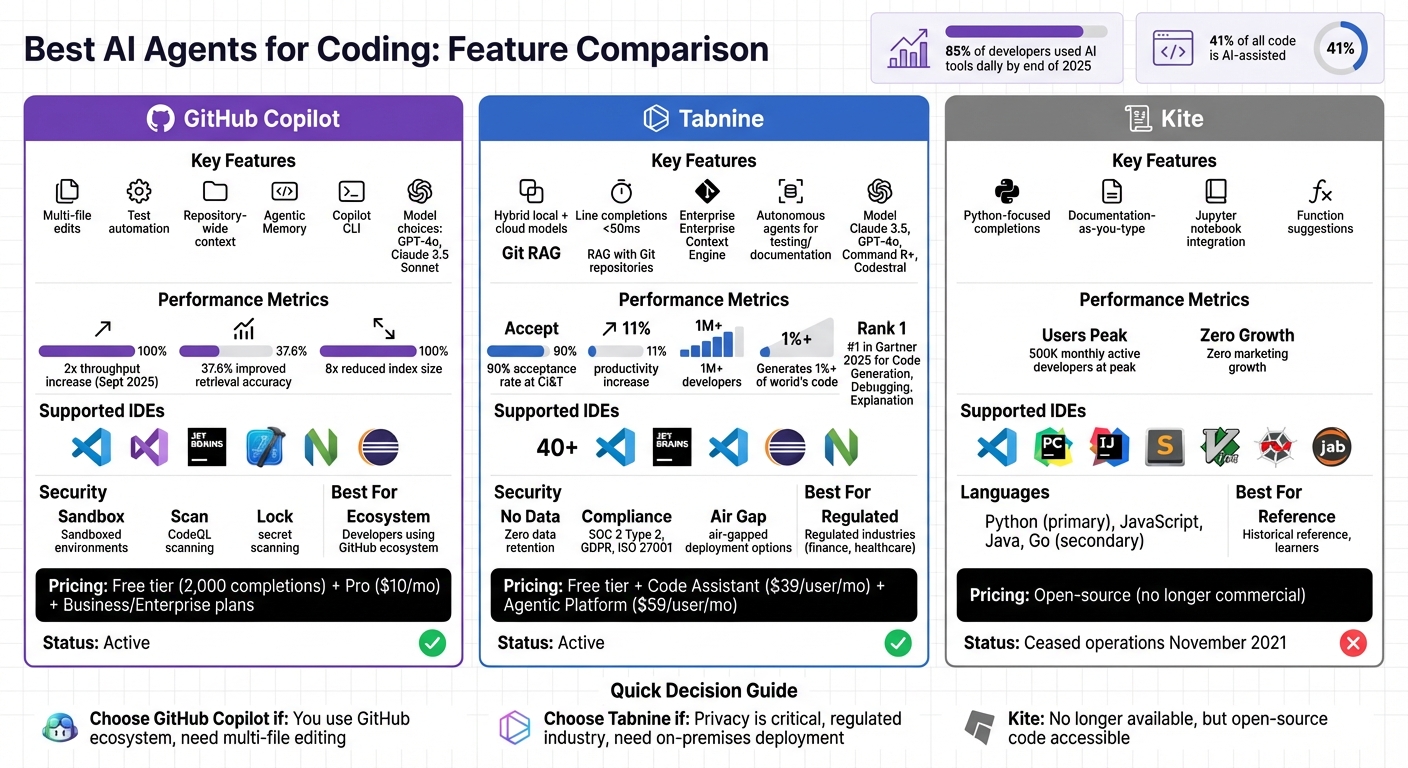
Comparison of GitHub Copilot, Tabnine, and Kite AI Coding Assistants
Best AI Coding Tools for Developers in 2025
1. GitHub Copilot
GitHub Copilot has grown from a simple autocomplete tool into a robust coding assistant. In its Agent mode, it can analyze your code, suggest edits across multiple files, run tests, and validate results. This lets you concentrate on the bigger picture, like architectural decisions, while Copilot handles the details.
Features and Capabilities
One of the standout features is Copilot Edits, which allows you to make complex, multi-file changes with just a single chat prompt. Instead of manually jumping between files, you can describe what you need, and Copilot takes care of the rest. Another powerful tool is Plan Mode, which drafts a technical blueprint before any coding begins.
Agentic Memory, currently in public preview, learns patterns in your repository to improve future suggestions. For command-line enthusiasts, Copilot CLI integrates directly into the terminal, making tasks like mapping project structures or installing dependencies more streamlined. Developers can also customize Copilot’s behavior via Custom Instructions by using AGENTS.md files, ensuring its responses align with your team’s coding practices.
Copilot offers flexible model choices, letting you pick between OpenAI’s GPT-4o and Anthropic’s Claude 3.5 Sonnet. Alternatively, you can use "Auto" mode to let Copilot choose the best model for the task. Since September 2025, Copilot has doubled its throughput, improved retrieval accuracy by 37.6%, and reduced its index size by eight times for better performance.
Supported Languages
GitHub Copilot supports a wide range of development environments, including VS Code, Visual Studio, JetBrains IDEs, Xcode, Neovim, Eclipse, Azure Data Studio, and SQL Server Management Studio. This ensures compatibility with most programming languages and workflows, no matter your preferred IDE.
Deployment and Privacy
Copilot is designed with security and privacy in mind. It operates in sandboxed environments using GitHub Actions, keeping changes isolated from your main codebase. A built-in firewall prevents unauthorized data sharing, and the agent only responds to users with repository write access. Additionally, it only pushes changes to branches starting with copilot/, avoiding direct modifications to main or master.
To ensure code quality, Copilot scans generated code with CodeQL to detect vulnerabilities, performs secret scanning to catch leaked API keys, and checks dependencies against the GitHub Advisory Database. All commits are co-authored by the assigning developer, maintaining transparency and a clear audit trail.
Pricing
GitHub Copilot offers a free tier that includes access to Claude 3.5 Sonnet and GPT-4o. For more advanced needs, paid plans like Copilot Pro, Copilot Pro+, Copilot Business, and Copilot Enterprise are available. Tasks assigned to Copilot agents use GitHub Actions minutes and premium requests from your monthly quota. Business and Enterprise plans also provide tools to track spending and set budget alerts, making it easier to manage costs effectively.
2. Tabnine
Tabnine stands out as a trusted choice for developers and enterprises, combining speed, privacy, and security in a way that's tailored for demanding environments. While tools like Copilot focus on deep ecosystem integration, Tabnine takes a different path by emphasizing a hybrid, privacy-first architecture. This setup includes a lightweight local model for blazing-fast line completions (under 50ms), a larger cloud or VPC model for handling more complex tasks, and a context engine that indexes your entire workspace for comprehensive project awareness.
Features and Capabilities
Tabnine leverages Retrieval-Augmented Generation (RAG) to access Git repositories from platforms like GitHub, GitLab, Bitbucket, and Perforce. This allows it to provide suggestions based on a global project view rather than limiting itself to the file currently being edited. Its Enterprise Context Engine is particularly useful for teams working with diverse tech stacks or legacy systems, as it learns an organization’s architecture, frameworks, and coding standards.
The platform offers flexibility in model selection, letting users choose from options like Claude 3.5 Sonnet, GPT-4o, Command R+, Codestral, or even connect to private model endpoints. Additionally, Tabnine includes autonomous agents capable of handling tasks such as testing, documentation, and Jira implementation, all customizable to meet specific standards.
In the 2025 Gartner Critical Capabilities report, Tabnine earned the top spot for Code Generation, Code Debugging, and Code Explanation use cases. At CI&T, developers embraced 90% of Tabnine's single-line coding suggestions, leading to an 11% productivity boost. Luis Ribiero, Head of Engineering at CI&T, shared:
"Tabnine has boosted developer productivity for CI&T: The company's developers accept 90% of the tool's single-line coding suggestions, resulting in an 11% productivity increase across projects".
These capabilities are complemented by support for a wide array of programming languages and seamless IDE integration.
Supported Languages
Tabnine is compatible with all major programming languages, including Python, JavaScript, PHP, HTML5, CSS, React, and JQuery. It integrates with over 40 IDEs, such as VS Code, the JetBrains suite, Visual Studio 2022/2026, Eclipse, and Neovim. With a user base exceeding 1 million developers, Tabnine has contributed to generating over 1% of the world’s code, automating 30%–50% of code creation for individual developers.
Deployment and Privacy
Tabnine’s deployment options and privacy measures are designed with enterprises in mind. It adheres to a zero data retention policy, ensuring that your code is never stored, shared, or used to train models. Its proprietary models are exclusively trained on permissively licensed open-source code (e.g., MIT, Apache 2.0, BSD), eliminating any risk of intellectual property violations.
Deployment options include secure SaaS, VPC, on-premises setups, or fully air-gapped environments where no data leaves your infrastructure. Tabnine meets compliance standards such as SOC 2 Type 2, GDPR, ISO 27001, and ISO 9001, and offers full IP indemnification for enterprise users.
Pricing
Tabnine offers pricing options that scale with its advanced features:
- A free tier is available for basic use in popular IDEs.
- Tabnine Code Assistant costs $39 per user per month (billed annually) and includes AI completions, chat features, and Jira Cloud integration.
- The Tabnine Agentic Platform is priced at $59 per user per month (billed annually), adding autonomous agents, the Enterprise Context Engine, and the Tabnine CLI.
- For private LLMs deployed on-premises, usage is unlimited. Reserved token consumption for Tabnine-provided LLMs is billed at provider rates, plus a 5% handling fee.
3. Kite
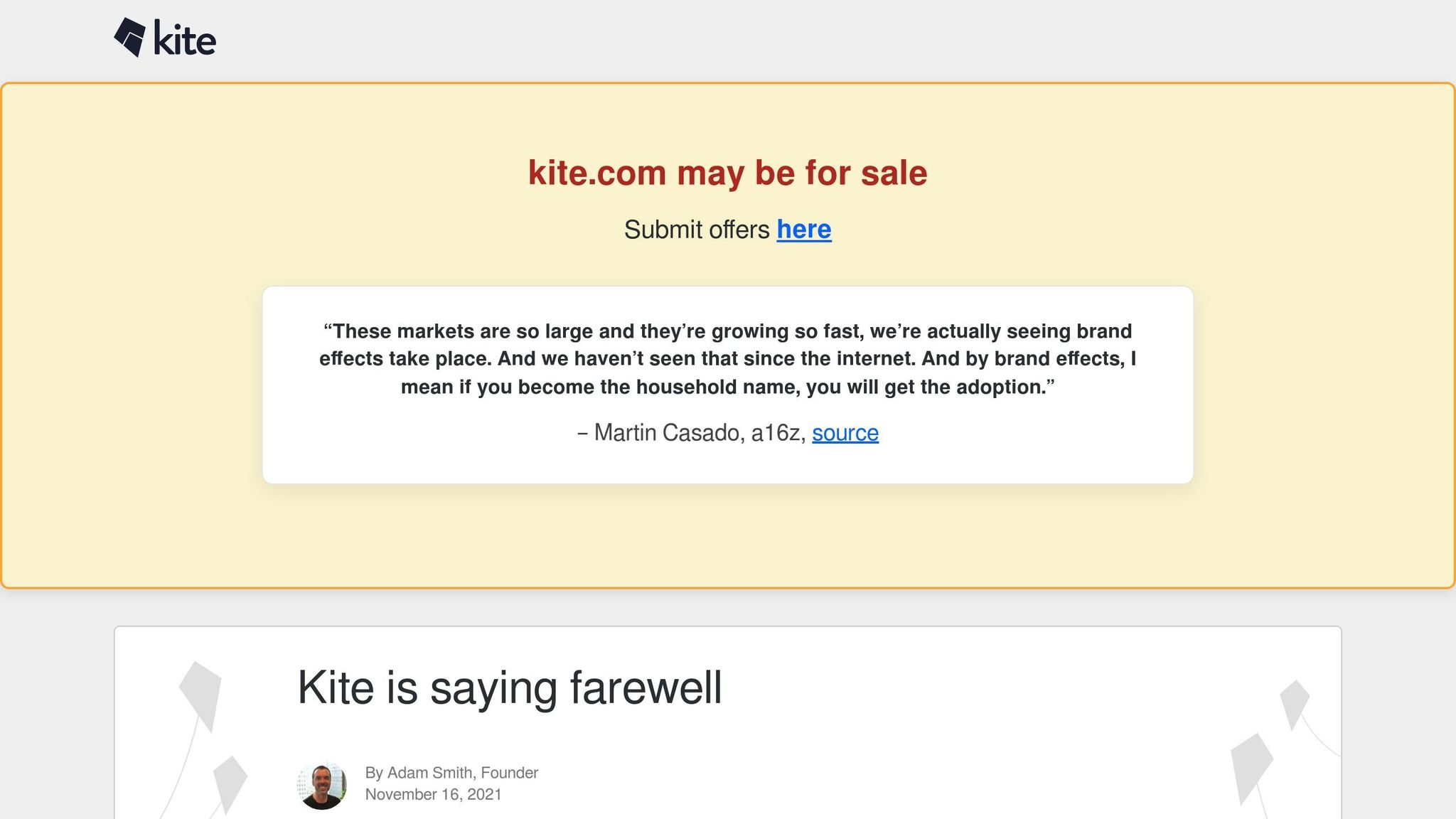
Kite was a trailblazer in the world of AI coding tools. While it ceased operations in November 2021, its open-source contributions continue to leave a lasting mark on the field. At its height, Kite attracted 500,000 monthly-active developers, achieving this milestone with virtually no marketing - a testament to its early impact on AI-driven coding assistance.
Features and Capabilities
Kite was designed with a strong focus on Python, offering advanced features like intelligent line-of-code completions and entire function suggestions as developers typed. One of its standout features was the "documentation as you type" function, which allowed developers to view relevant documentation without leaving their IDE - a major productivity boost [28,32].
Kite also integrated directly with Jupyter notebooks, making it especially useful for Python-based data science work. After its closure, Kite's technology was open-sourced on GitHub, including its Python type inference engine, public-package analyzer, desktop software, and editor integrations.
Kite's founder, Adam Smith, reflected on the challenges the company faced:
"We built the most-advanced AI for helping developers at the time, but it fell short of the 10× improvement required to break through because the state of the art for ML on code is not good enough".
Supported Languages
Unlike modern AI coding tools that support a wide range of languages, Kite focused on deep specialization in Python. It also provided secondary support for JavaScript, Java, and Go [28,32]. The tool was compatible with popular IDEs such as VS Code, PyCharm, IntelliJ, Sublime, Vim, Spyder, and JupyterLab. For Python developers, Kite was particularly well-regarded for its seamless integration with Jupyter notebooks and robust language support. Its contributions to Python development tools set a high standard that continues to influence current technologies.
Pricing
Kite operated on a freemium model during its active years but is no longer available as a commercial product. The tool stopped receiving updates and support in November 2021, with its core components now accessible as open-source code on GitHub.
The company's struggles with monetization offer valuable insights for the industry. Despite its large user base, monetizing individual developers proved challenging. As Adam Smith noted:
"Our 500k developers would not pay to use it. Our diagnosis is that individual developers do not pay for tools".
For those interested, Kite's open-source components remain available, providing a glimpse into its pioneering technology. While no longer active, Kite's innovations continue to inspire the development of modern AI coding assistants.
Strengths and Weaknesses
This section breaks down the strengths and trade-offs of each AI coding tool, helping you decide which one fits your needs.
Each tool brings something unique to the table. GitHub Copilot integrates seamlessly with the GitHub ecosystem, delivering a smooth inline completion experience. It's particularly effective for generating boilerplate code, repetitive CRUD operations, and test cases with high accuracy. Its "Agent Mode" can even write, test, and validate code autonomously, including fixing runtime errors on the fly. However, it has been criticized for weaker reasoning capabilities compared to newer tools and for occasionally producing lackluster commit messages.
Tabnine is a standout choice for those prioritizing privacy. Its focus on on-premises deployment makes it a strong option for industries with strict compliance requirements, like finance or healthcare. It offers efficient completions with minimal setup and works seamlessly in popular IDEs such as VS Code and JetBrains.
Kite, though no longer active, was a trailblazer in its time. It introduced intelligent Python completions and features like documentation-as-you-type, which set benchmarks for the industry before shutting down in November 2021.
Despite their strengths, all three tools share common challenges. AI coding agents still require thorough human review to catch potential issues like incorrect API usage or insecure practices, such as storing sensitive data in plaintext. Studies also suggest that heavy reliance on AI tools can reduce developers' code mastery by 17% and slow down complex open-source tasks by 19%, even though these tools excel at speeding up routine coding.
Here’s a quick comparison of their strengths, weaknesses, and ideal use cases:
| Tool | Primary Strength | Main Weakness | Best For | Pricing |
|---|---|---|---|---|
| GitHub Copilot | Strong GitHub integration; reliable autocomplete | Limited reasoning capabilities | Teams already using GitHub | Free (2,000 completions); Pro ($10/mo) |
| Tabnine | Privacy-focused; supports on-premises deployment | Lacks advanced reasoning features | Regulated industries (finance, healthcare) | Basic (Free); Dev ($9/mo) |
| Kite | Early innovator in Python completions and documentation | No longer active (ceased Nov 2021) | Historical reference; learners | Open-source (no longer commercial) |
These comparisons provide the groundwork for choosing the tool that best suits your workflow and priorities.
Conclusion
After reviewing the features and limitations of top AI coding assistants, here are some streamlined options to consider for your development workflow.
GitHub Copilot stands out for its smooth integration with VS Code and GitHub, making it a great pick for individual developers. With its free tier offering up to 2,000 completions per month and an affordable Pro plan, it’s an accessible choice for beginners and solo programmers alike.
For teams in industries like finance or healthcare, Tabnine provides strong privacy and compliance features, including secure on-premises deployments and support for multiple programming languages. It meets rigorous security standards, such as SOC 2 Type II, while offering competitive pricing options for organizations with strict requirements.
Although Kite ceased operations in November 2021, it played a pioneering role in Python assistance. Its early innovations in code completions and documentation have influenced many of the tools available today.
When selecting an AI code assistant, think about factors like security certifications, centralized management capabilities, and how well the tool integrates into your current workflow. Free tiers are a great way to test these tools and can help streamline tasks like boilerplate generation, debugging, and documentation - potentially saving up to 50% of your time.
Assess your current coding process and experiment with free-tier options to discover which assistant enhances your productivity the most.
FAQs
Which AI coding tool fits my workflow best?
The best AI coding tool really depends on what you're working on and the tools you already use. GitHub Copilot stands out for its versatility, offering seamless integration with popular IDEs and providing real-time autocomplete suggestions. For those tackling complex projects that require multi-file refactoring, Cursor Pro is a strong option. On the other hand, if your focus is debugging or dealing with legacy code, Claude Code shines with its accuracy, especially in terminal-based workflows. Your choice should align with your current tools and the complexity of your projects.
How can I use AI coding agents without leaking private code?
To keep your AI coding agents secure, start by setting up strict privacy settings. Make sure to sanitize input data thoroughly and avoid sharing any sensitive code with cloud-based tools. It's also crucial to have a human review process in place for AI-generated outputs. This extra layer of oversight helps prevent leaks and ensures confidentiality. By following these precautions, you can safely use AI tools while keeping your private code protected.
How do I verify AI-generated code is safe and correct?
To make sure AI-generated code is reliable and secure, start with automated tests and static analysis tools to catch errors, warnings, and ensure the code compiles properly. Tools like CodeQL and Dependabot are particularly useful for spotting vulnerabilities and dependency issues. Beyond automation, take the time to manually review critical or complex parts of the code to ensure they align with your project’s safety requirements. A balanced approach that blends automated checks with human oversight is key to achieving dependable results.